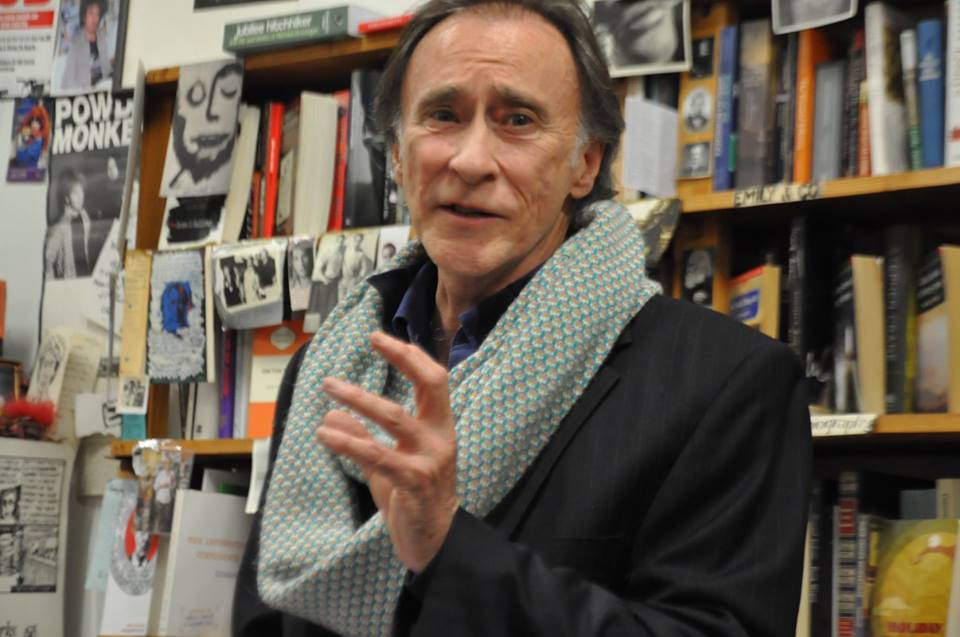
Born in Germany to German and Russian parents, Peter Lach-Newinsky came to Australia as an infant and grew up in Sydney speaking German at home. After studying English, French, German, Theatre and Political Philosophy at Sydney, Munich and Frankfurt universities, he lived and worked in Germany from 1967 to 1987. He returned to Australia with his wife and son after the Chernobyl disaster.
Peter’s three poetry books are Cut a Long Story Short (Puncher & Wattmann 2014), Requiem (Picaro Press New Work 2012) and The Post-Man Letters & Other Poems (Picaro Press New Work 2010). His awards include the Varuna-Picaro Publishing Fellowship Prize (2009), the Melbourne Poets Union International Poetry Prize (2009 and 2010) and the Vera Newsom Poetry Prize (2011). Published in Best Australian Poetry 2015, he has also been twice shortlisted for the Newcastle Poetry Prize, and been runner-up or commended in the Overland Judith Wright Poetry Prize for New and Emerging Poets, the Arts Queensland Val Vallis Poetry Prize, the Shoalhaven Literary Award.
Peter lives with his wife Barbara in Bundanoon in the southern highlands of New South Wales. Their twenty-acre working property is designed along permaculture lines and includes 120 heritage apple varieties.
Stuart Barnes was born and grew up in Hobart and lived in Melbourne for seventeen years before moving to Rockhampton, Australia. His first poetry collection, Glasshouses (UQP), won the Arts Queensland Thomas Shapcott Poetry Prize, was commended for the FAW Anne Elder Award and shortlisted for the ASAL Dame Mary Gilmore Award. From 2014–2015 Stuart was poetry editor of Verity La and from 2013–2017 poetry editor of Tincture Journal. Since 2017 he has been a program advisor for Queensland Poetry Festival. In 2018 he served on the advisory board of Bent Window Books and guest co-edited, with Quinn Eades, Cordite Poetry Review’s TRANSQUEER issue. Stuart’s writing has been published/is forthcoming in Australian Book Review, Cordite Poetry Review, Meanjin, Overland, Plumwood Mountain, POETRY (Chicago), Poetry Ireland, Rabbit Poetry Journal, Southerly, Transnational Literature, Verity La, Westerly and The Weekend Australian Review. Commissioned poems have been published in Peril Magazine and at Red Room Company and are forthcoming in Australian Poetry Journal. Stuart’s working on his second poetry collection, Form & Function, and a novel.
Glasshouses, described as ‘playful, subtle, moving, witty and outrageous … a major achievement’ (William Yeoman), ‘an impressive balancing act between a love of precursors and the strategies of the avant-garde’ (Geoff Page) and ‘[a] complex but compelling collection that captures joy, pain, beauty, darkness and adventure, sometimes all at once’ (Sally Piper), is available from a number of bookshops.
I was given a Voigtländer Vito B in the 1970s and started taking photos. Since then I’ve never stopped taking photos but am only now beginning to understand how difficult photography really is. I make images that satisfy my inner need for simplicity and tranquility.
I haven’t arrived at a ‘style,’ but I recognise that my frames do have a ‘look.’ Always distracted by light and practically addicted to contre-jour images—I have no explanation of why that came to be my way of making images. It may be just the edges and contrasts backlighting brings to an image. Also, I like my images to capture drama and serenity in equal measure—and landscape really helps with that.
Because I learnt photography on film and with old-school chemical darkroom technique, I had to unlearn a lot of technical things about exposure when transitioning to digital. I can get wrapped up in the technical aspects of photography, sometimes even to the point of losing what I’m shooting for! I’m more likely to get a keeper by simply responding to the light of a scene.
I was born on the north-west coast of Tasmania and grew up there before running away to sea, and then becoming an educational systems designer by way of industrial design and teaching. I live and work in Hobart and most of the images in the gallery are from Tassie.
I’ve been lucky to travel to Iceland twice and have recently been to Cornwall and Japan. There are only a couple of frames in this gallery from those islands but plenty more on flickr.
Me—what can I say? Poetry has been a core part of my life since I was about 19 with a largish gap in the middle pursuing career and family. At its best, poetry can say things unutterable anywhere else and I’m completely committed to it. I really am now a one trick pony even if the beast is as thin as poetry is. I edit and run workshops which provides a bit of income but is much more rewarding on deeper levels. Most of my publishing work is aimed at getting new audiences rather than “clogging up” pre-existing outlets. Varying approaches, but some extraordinary outcomes in terms of getting poetry in front of people who wouldn’t normally encounter it. As for my own work I feel blessed that I have seen publication in rather a lot of places/countries/languages.
I constantly work at bettering my poetry, I don’t share (a surprisingly common) delusion that I am a (grossly unrecognised) International Treasure. Compared to say actors I have occasionally said I am not a Streep or de Niro, but I aspire to be maybe Brian Dennehy. But heard today he has died!
Steve Cox is an artist and writer. He has a forty-year exhibition history and his work is held in major public and private collections throughout Australia and internationally. As an arts writer, since 2000, he has contributed articles and reviews, and has conducted interviews with artists, for numerous newspapers, journals and magazines, including The Guardian; VAULT: Australasian Art & Culture; Gay Times, UK; FilmInk.com, amongst others. Cox writes on a range of subjects, including contemporary and historical art; LGBTQI issues; social issues; cinema; contemporary music.
Between 2013–2014, he was the London Arts Editor of NakedButSafe magazine. In 2019 he was on the judging panel for the Young Arts Journalist Award (YAJA). Also in 2019, he was the inaugural Writer in Residence for Brunswick Street Village, an innovative building complex, which espouses green values and arts in the community as a primary concern. During the residency, he produced a collection of fifty poems, on a range of subjects.
Gina Mercer enjoys a three-stranded career as writer, teacher, and editor. She has taught creative writing and literature in universities and communities for 35 years. She was Editor of Island from 2006–2010. She has a passion for working with writers as book doula. Gina has performed her poetry in cities and regions throughout Australia as well as Canada and Ireland. Recently she’s collaborated with musicians interweaving their original compositions with her eco-poetry in the performances: ‘Off with the Birds’ and ‘Diving into the Derwent’. She’s been writer-in-residence at Prince Edward Island (Canada), Varuna (NSW), the Tasmanian Writers’ Centre and Katherine Susannah Prichard Writers’ Centre (WA). She’s published widely in journals, anthologies, and diaries, as well as ten books (poetry, fiction, academic nonfiction). The three most recent books are: The Dictionary of Water, a limited edition poetry collection, Wild Element Press (email), 2019; Weaving Nests with Smoke and Stone, a poetry collection all about birds, Walleah Press, 2015; and The Sky Falls Down: An Anthology of Loss, co-edited with Terry Whitebeach, Ginninderra Press, 2019.
Alex Skovron was born in Poland, lived briefly in Israel, and emigrated to Australia in 1958, aged nearly ten. His family settled in Sydney, where he grew up and completed his studies. From the early 1970s he worked as an editor for book publishers in Sydney and (after 1980) Melbourne; since the 1990s he has worked as a freelance editor. His poetry has appeared widely in Australia and overseas. The Rearrangement (1988), his first book, won the Anne Elder and Mary Gilmore awards and was shortlisted in the NSW Premier’s Awards; there followed Sleeve Notes (1992), Infinite City: 100 Sonnetinas (1999, shortlisted in the Age Book of the Year and Victorian Premier’s Awards), The Man and the Map (2003), Autographs: 56 poems in prose (2008), and Towards the Equator: New & Selected Poems (2014, shortlisted in the Prime Minister’s Literary Awards). Other awards have included the Wesley Michel Wright Prize for Poetry, the John Shaw Neilson Poetry Award, and the Australian Book Review Poetry Prize. The numerous public readings he has given include appearances in China, Serbia, India, Ireland, Macedonia, Portugal, and on Norfolk Island. An 80-minute CD in which he reads from his poetry was published in 2019 under the title Towards the Equator. His next collection, Letters from the Periphery, is due in 2021.
Concurrently with his poetry, Alex has intermittently published in prose, including short stories, a novella, and the abovementioned Autographs, which can be read as a book of microstories. The novella, titled The Poet (2005), was joint winner of the FAW Christina Stead Award for a work of fiction and has been translated into Czech. The Attic, a bilingual selection of his poems translated into French, was published by PEN Melbourne in 2013; and Water Music, a bilingual volume of Chinese translations in the Flying Island series (Macau), came out in 2017. Some of his poetry has also been translated into Dutch, Polish, Spanish, Macedonian and German. His collection of short stories, The Man who Took to his Bed, was published in 2017, and a Czech-language edition appeared in 2019. He has collaborated with his Czech translator, Josef Tomáš, on English translations of the twentieth-century Czech poets Jiří Orten and Vladimír Holan.
Concerns that have driven Alex Skovron’s poetry and fiction are many and various: history, language and music; the riddles of time and the allure of memory; philosophy, faith and the quest for self-knowledge; art and the creative impulse; fantasy, eros and the affections. His interest in speculative fiction has played a recurring role in his thinking and his work, as has a lifelong passion for music. As a poet, he enjoys both the disciplines and the aesthetics of formal design and the diverse challenges of freer structures. Integral to his project has been a focus on musicality and the primacy of rhythm. He likes probing the elasticities of syntax, and exploiting the ‘contrapuntal’ layerings available to imagery and meaning via compression, connotation, ambiguity.
My language is paint. I speak through the medium of paint and ink, pencil and pastel. This is a language I am always learning, a language of challenge and a language of love, where I try to express my thoughts and responses to the world around me, bear witness to the actions of mankind and the wonder and beauty of the land.
This land speaks to me, speaks of its ancient presence, of the justice and injustice it has witnessed, the rich oasis that was ours to nurture. We ravaged it, murdered and displaced its indigenous peoples, poisoned it with chemicals, tore down the trees and made extinct so many of its animals, plants and insects. The land gave to us so that we would take what we need, not more. Now we face our own extinction.
Painting is a passion and a refuge. My hope is that I have something to say and something to give, that I can be heard and can communicate through the language of my paint.
Originally from the west of Ireland and living in Sydney, Anne Casey is author of two poetry collections—where the lost things go (Salmon Poetry 2017, 2nd ed 2018) and out of emptied cups (Salmon Poetry, 2019). Anne has worked for 30 years as a journalist, magazine editor, media communications director and legal author. Her writing and poetry rank in leading national daily newspaper, The Irish Times’ ‘Most-Read’ and are widely published internationally—The Irish Times, Entropy, apt, Murmur House, Quiddity, Barzakh (State University of New York), DASH (California State University), FourXFour (Poetry Northern Ireland), Cordite, The Canberra Times, Verity La and Plumwood Mountain among others. Anne’s poetry has won/shortlisted for awards in Ireland, Northern Ireland, the USA, the UK, Canada, Hong Kong and Australia. She is Senior Poetry Editor of Other Terrain Journal and Backstory Journal (Swinburne University, Melbourne) and sits on numerous literary advisory boards.
James Walton was a librarian, a farm labourer, and mostly a public sector union official. He is published in many anthologies, journals, and newspapers. He has been shortlisted for the ACU National Literature Prize, the MPU International Prize, The William Wantling Prize, the James Tate Prize, and is a winner of the Raw Art Review Chapbook Competition. His poetry collections include The Leviathan’s Apprentice 2015 Publish and Print U.K., Walking Through Fences 2018 ASM & Cerberus Press, Unstill Mosaics Busybird 2019, and Abandoned Soliloquies Uncollected Press 2019.