James Walton was a librarian, a farm labourer, and mostly a public sector union official. He is published in many anthologies, journals, and newspapers. He has been shortlisted for the ACU National Literature Prize, the MPU International Prize, The William Wantling Prize, the James Tate Prize, and is a winner of the Raw Art Review Chapbook Competition. His poetry collections include The Leviathan’s Apprentice 2015 Publish and Print U.K., Walking Through Fences 2018 ASM & Cerberus Press, Unstill Mosaics Busybird 2019, and Abandoned Soliloquies Uncollected Press 2019.
Davide Angelo’s poems have appeared in Cordite Poetry Review, Overland, WA Poets Inc, Visible Ink, and elsewhere. In 2019 he was awarded Second Prize in the Melbourne Poets Union International Poetry Prize, long-listed for the University of Canberra Vice Chancellor’s International Poetry Prize and received a Highly Commended in the Ros Spencer Poetry Prize. He lives in Bendigo, Victoria.
UNFURL is a publishing and social media project in which writers and artists distribute their work and reach new audiences by combining the power of their social media contacts.
Each UNFURL number (or edition) is an independently hosted web page—and that web page is linked to the UNFURL website where all the contributors’ biographical info is maintained.
UNFURL is free for readers and contributors. It costs you nothing to distribute or for readers to read.
Writers and artists who contribute co-operate to promote each other by offering to use whatever means they have to distribute the URLs of each edition as they become available. That could be as simple as sharing the link on your Facebook timeline, Instagram feed, website, or Twitter.
Each time a new edition of UNFURL is released the network of social media contacts widens.
Keeping UNFURL alive expands the audience for your work.
There will be new editions of UNFURL now and then, depending on how long it takes for contributors (and UNFURL editors … yes, it is possible there might one day be more of them) to herd all their cats. There are no deadlines.
When you are invited to UNFURL you will also be invited to a Facebook contributor group. There’s information and discussion in it you may find useful. However, the basics are outlined here.
If you do not have a Facebook account, essential information is also sent to your email address.
It’s self-curation, people
You decide for yourself what you want to publish.
You can assume the only constraints are the editor’s time, and your work’s legality and decency (the last being a fiction entirely in the editor’s mind).
Occasionally the editor may try to prevent you making a mistake, and how things work out will depend on how you respond to friendly advice. You must approve of your contribution.
For visual artists of any kind UNFURL is straightforward. It’s about images, still or moving. You have options.
For complete personal control over the content, you could ‘host’ (or publish) all images yourself and UNFURL will simply link to your content.
This could be your website, or your Google Drive folder of photographs, or your Flickr account. You just need to keep in mind that if you manage it this way you have decided to opt out of the integrated presentation of images that UNFURL is offering to you.
In this case all UNFURL needs is an artist statement, biographical information, a photo of you, and the links to your work.
Video art stays on YouTube or Vimeo and is embedded in UNFURL.
If you want to create a gallery in an edition of UNFURL, gather your images together and prepare them in the following way:
Make the images as small as possible to display properly on a laptop or tablet computer — about 1200 pixels wide (at 72dpi) is usually enough.
Use a ‘lossy’ and compressible format like .JPG.
If possible, put a very discrete watermark on your images. (This helps to protect you against unauthorised re-use.)
Name the files with the title of the work, a date (year), and your name. Add the dimensions of the work, if you wish, or if you think it is relevant.
This is the format:
Title of work (medium, dimensions, YEAR) Artist’s Name.jpg
When UNFURL captions the work, the work’s title will appear in italics, exactly as you have named the file. UNFURL simply drops the “.jpg” from the end.
UNFURL hosts a document that contains your writing and biographical information.
UNFURL maintains the document in a format consistent with other writers.
Achieving this requires documents to be made with a Word template that uses automated styles to apply formatting to the text. If you are not used to doing this in Microsoft Word, or with working with Word online, the UNFURL editor will assist you.
Create a text document of your own in whatever program you use for writing. (If you use a typewriter, congratulations and UNFURL will scan your pages and publish the images.)
Make sure that document contains only basic formatting—i.e., bold or italics—and is preferably an RTF-type document (rich text format).
You can send this document to UNFURL, or
Cut and paste all the text you want to publish into the online document that UNFURL will embed directly into the edition in which your work will appear. You access that online document through a link that the UNFURL editor sends to you.
If your writing contains complicated or fancy indenting (Go, poets!), do that last and in the final document.
Microsoft Word cannot do everything. If you are imagining something ‘different,’ speak to the UNFURL editor and an attempt will (probably) be made to accommodate your pernicketiness.
You will get to proof everything before it is published.
For the time being the document you create will not be embedded in the UNFURL in which you are published. Instead, a link in the UNFURL will open a PDF that can be read online. UNFURL hopes that embedding will be possible in future.
The editing process for writers sometimes includes collaborating on an online version of the document to be published by UNFURL. It’s an uncomplicated way to work and exchange questions on a document without passing versions back and forth.
If the editor sends you a link, it will open in a browser and will save itself automatically when you make changes.
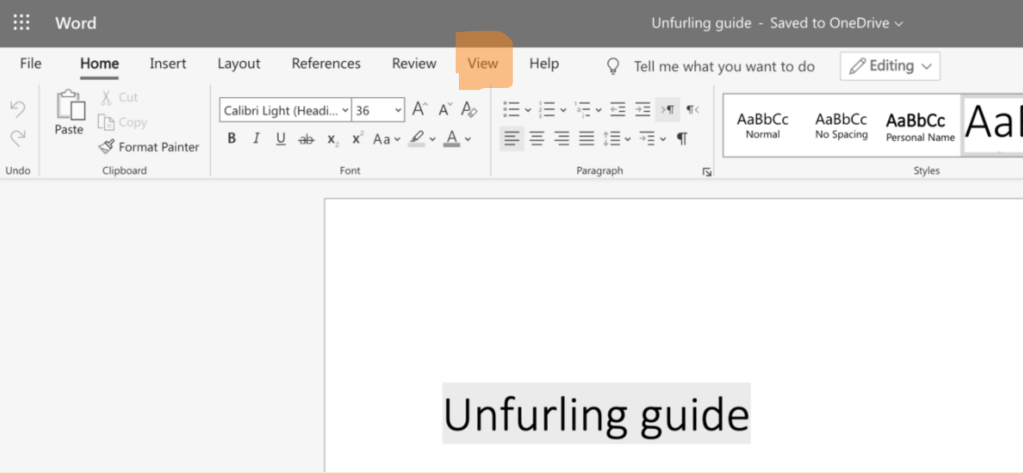
The online document appears slightly different on-screen than on paper. To view how the document will look if printed (or as a PDF), click on “View” in the menu bar …
And then click on “Reading view” …
What then?
You’ll be invited to join a Facebook ‘unfurl contributors’ group. If you are on Facebook, please join.
If you do not have a Facebook account, congratulations. Stay connected through email — ‹unfurleditor@gmail.com›.
Distribute the links to unfurl editions as they become available.
Each new edition will have links to the previous editions, or to the UNFURL home page, so your contribution is not forgotten.
Your contribution is listed at the unfurl home, and on various other sites, like linktr.ee, ‹https://linktr.ee/unfurl›.
Every unfurl has its own bit.ly link so we can count readers and follow where those readers are.
Use those links to promote your writing and art through your social media, your website, or even just by sending the link to your friends by email.
You can link directly to your section of the UNFURL in which you are published.
Every UNFURL has links to every other edition of UNFURL, so the work you have done to contribute to the publication always pays back. At the very least, your work remains in front of readers and the links in your ‘bio’ continue to provide a new avenue for readers to discover your work.
Distributing UNFURL is easy. Each edition has a link, and a related group of constantly updated reference pages on the web.
UNFURL uses bit.ly links so we can count how many people are reading your work.
The contributor Facebook group will publish links to each edition and other materials you can use.
You can put these links in Facebook posts, with your own recommendation or with the few words provided in the Facebook contributor group.
If you do not have a Facebook account, the links will be sent to your email address. (The emailed information is sent to everyone anyway.)
Use Twitter to distribute the link. Add a few relevant hashtags, and/or send it directly to people or groups you think may find it interesting.
Instagram is not a highly effective tool for working with links, but it is worth a try if you have an account. Use one of your own graphics, or one from UNFURL, and put the bit.ly link in the first comment, along with appropriate hashtags.
You can use your own email contact lists to send the UNFURL link to your friends and family.
You can put the UNFURL link on your web page, in the bio section, or listed as another place to view or read your work.






 UNFURL